Rotation and External CV
Field Rotation
Field Rotation is unique to this instrument, and is set by the first, left-most thumbwheel on the side of the instrument. It rotates the position of fields around the instrument — all the sounds and settings of field 1 move to field 2, field 2 to field 3, and so on. You can think of it as a form of sequencing.
After one complete rotation, the entire instrument's pitch is transposed up one octave.
Try the demo below to see how rotation affects the instrument's fields.
Rotation and Presets
When saving or loading presets, the preset is saved with fields in their current positions. Presets load exactly from their saved positions, regardless of the rotate thumbwheel. What you are currently hearing is what you save in a preset.
Rotation octave transpositions are completely superficial and are not saved or loaded via presets.
Rotation CV Input
The jack input next to the thumbwheel labeled ROTATE controls rotation through external CV. Higher voltages produce higher rotations, so a varying voltage creates different rotation patterns.
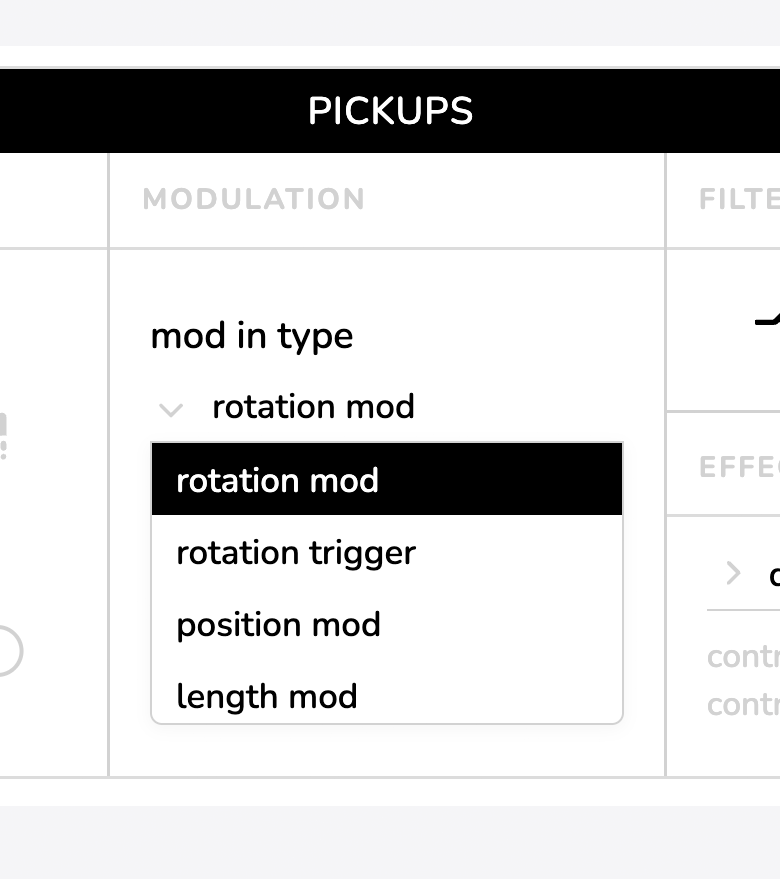
Additional CV input modes are configurable through the companion app. Open the pickup settings menu by clicking or tapping the icon. The drop down menu labeled mod in type allows you to choose between the four different modes.
In all cases, the rotate thumbwheel always performs the same action.
The external CV can be configured into four different modes via the app:
| MODE | DESCRIPTION |
|---|---|
| Rotation CV | Higher voltages produce higher rotations. |
| Rotation Trigger | Fields rotate one step per rising CV pulse — acts like a 7-step sequencer. |
| Position Mod | CV input controls position on all selected fields. |
| Length Mod | CV input controls length on all selected fields. |
Rotation Trigger mode offsets the base starting position of the rotate thumbwheel. This means that the lowest position of the thumbwheel won't always be rotation position one. The knob still completes a full rotation cycle over its entire range.